How to detect scams

Detecting Scams
Scams and how to detect them
ServMe IT is asked numerous times a day if there are ways to detect scams. The answer is yes, although some are getting harder with the use of AI. Here’s what you need to look out for.
How to detect scam emails?
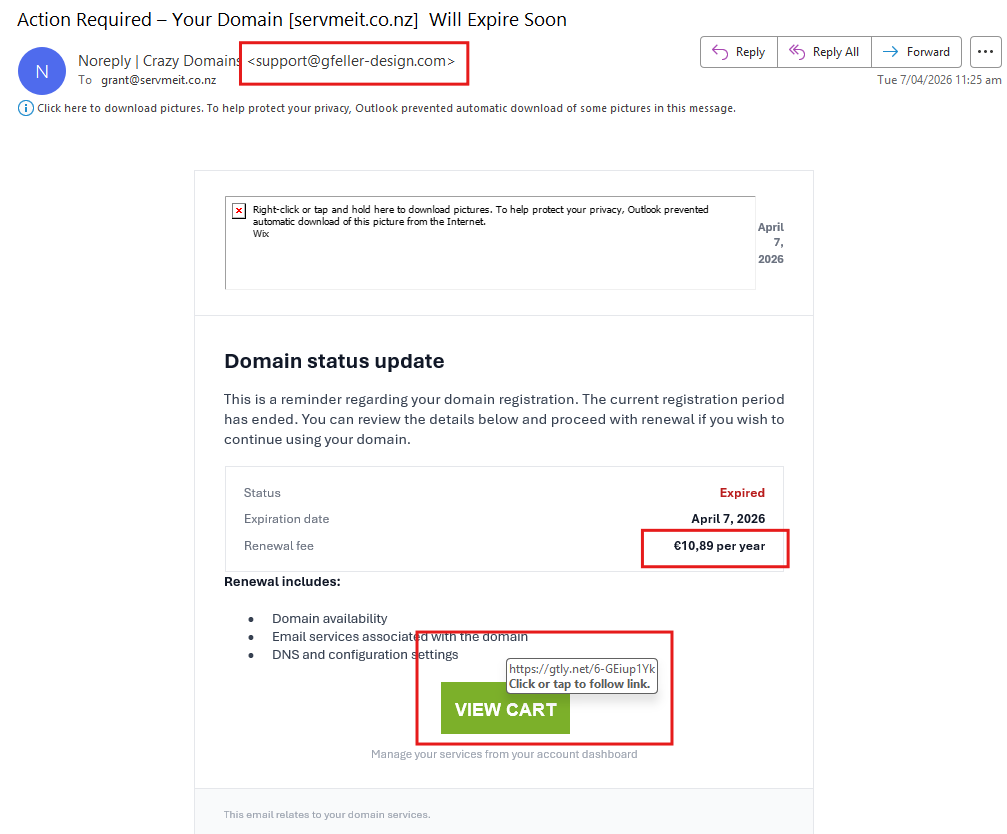
Looking at the email on the right, I’ve marked the areas to look at.
- At the top, we need to examine the email address. This email appears to come from Crazy Domains, their email addresses are xxxx@crazydomains.com. But this email appears to come from gfeller-design.com – definitely NOT Crazy Domains. Scam emails usually use fake email addresses (possibly why the name in the address says “Noreply”)
- Centre of the page, the next red blocks has a renewal figures in Euros. Crazy Domains uses either AUD or NZD, depending on where we are.
- Finally, near the bottom. Scam emails usually have a link they want you to click, taking you to a fake website which will collect the information you put in. Hovering over the button “View Cart” will show us to where the link is taking us. Here, “https://gtly.net/6-GEiup1Yk”, not somewhere in “https://crazydomains.com”. NEVER click on links sent in emails. Rather go directly to the insinuated address (in this case crazydomains) and check there. When I logged in this way, my domain is registered well into 2027. It has not expired.
How to detect scam emails?
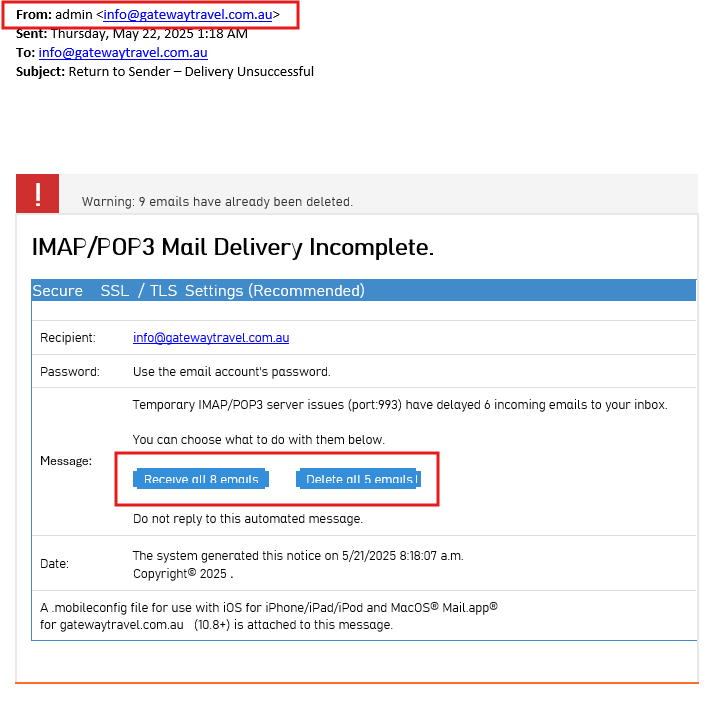
Looking at the email on the left, I’ve marked the areas to look at.
- At the top, we need to examine the email address. This email appears to come info@gatewaytravel.com.au, but it’s also to info@gatewaytravel.com.au. So I’m sending this to myself? This is another big warning sign.
- Then, we hover over the link they want you to click, and although not shown here, it wants to take us to “https://account.inspections.digital”, not my management platform.
How to detect scam emails?
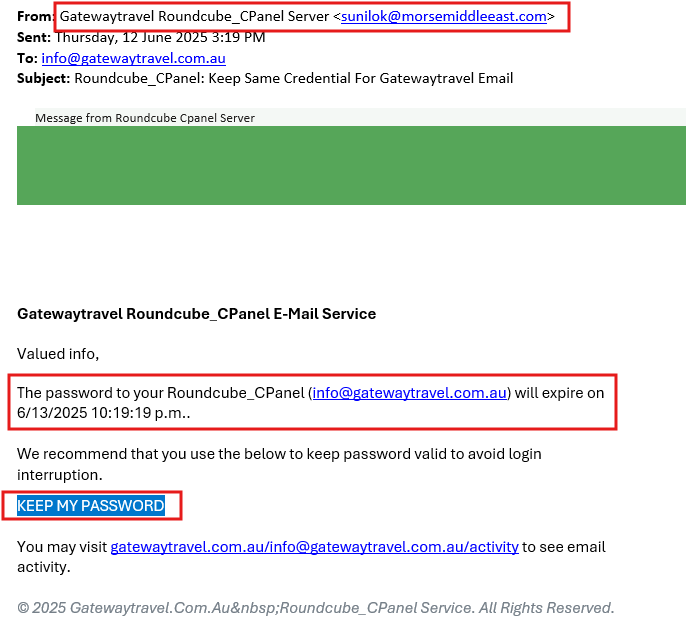
Looking at the email on the right, I’ve marked the areas to look at.
- At the top, we need to examine the email address. This email appears to come sunilok@morsemiddleeast.com, either a fake email address or stolen email address. You can block this email address, but it most likely will never be used again.
- The one thing I haven’t yet mentioned, is that most scams have a sense of urgency. In this, they are telling you your password is about to expire, and soon.
- Then, we hover over the link they want you to click, and although not shown here, it wants to take us to “https://ipfs.io/”, with some horrible looking text after that link. Definitely not my management platform.
Can you explain what sort of emails scams there are?
🔐 1. Phishing (The Classic)
The most common type.
What it looks like:
- Fake emails pretending to be from banks, Microsoft, courier companies, etc.
- Urgent tone: “Your account will be suspended!”
- Link to a fake login page
Goal: Steal usernames, passwords, or credit card info.
🎯 2. Spear Phishing (Targeted Attacks)
More sophisticated and personalized.
What it looks like:
- Appears to come from a colleague, boss, or supplier
- References real company info (names, projects)
Goal: Trick specific people into giving access or transferring money.
👔 3. Business Email Compromise (BEC)
One of the most financially damaging scams.
What it looks like:
- Fake or hacked email from a CEO or manager
- Requests urgent payment or bank detail changes
Example:
“Hey, I need you to process this invoice ASAP—confidential.”
Goal: Get businesses to transfer money to attackers.
💰 4. Invoice & Payment Scams
Very common for SMEs.
What it looks like:
- Fake invoices or altered real ones
- “Updated bank account details”
Goal: Redirect legitimate payments to scammers.
📦 5. Delivery / Courier Scams
Especially common around holidays.
What it looks like:
- Pretends to be from NZ Post, DHL, etc.
- “Missed delivery – pay fee or reschedule”
Goal: Steal payment info or install malware.
🦠 6. Malware Attachments
Dangerous and often overlooked.
What it looks like:
- Attachments like:
- “Invoice.pdf.exe”
- Word/Excel files asking to “Enable Macros”
Goal: Install ransomware, spyware, or keyloggers.
🔑 7. Credential Harvesting (Fake Login Pages)
Often tied to phishing.
What it looks like:
- Fake Microsoft 365 or Google login pages
- Links look legit but lead to spoofed domains
Goal: Capture login credentials.
💼 8. Job & Recruitment Scams
Targeting individuals and sometimes businesses.
What it looks like:
- Fake job offers
- Requests for personal info or upfront fees
💸 9. Refund / Overpayment Scams
Common in accounting environments.
What it looks like:
- “We overpaid you, please refund the difference”
Goal: Trick you into sending money back.
🔓 10. Tech Support Scams
Often combined with email + phone.
What it looks like:
- “Your system is infected—call this number”
- Pretends to be Microsoft or IT support
🚩 Key Red Flags to Watch For
Across all scam types:
- Urgency or pressure (“act now”)
- Suspicious links (hover to check URL)
- Unexpected attachments
- Slightly misspelled domains (e.g. micr0soft.com)
- Requests for payment or sensitive info
- Poor grammar (not always, though—scammers are improving)
🛡️ What does ServMe IT Recommend
- Email filtering (e.g. Microsoft 365 Defender)
- MFA on all accounts
- Staff security awareness training (essential)
- DNS filtering
- Regular backups (ransomware protection)
- SPF, DKIM, DMARC setup
💡 ServMe IT offers the following
- “Email Security Audit”
- “Phishing Simulation Training”
- “Business Email Protection Package”
The weakest link?
Unfortuately, the weakest link in your business is your staff. Most scams of today are being allowed in by someone clicking on a link, then following instructions on the webpage. Some webpages even offer phone numbers to fix the problem, pretending to be a reputable company like Microsoft. This makes you phone them, instead of your usual IT provider. Why would you do something like that??? Stick to whom you trust. Call ServMe IT, we will trace what’s happened, remove any scam software and give your system a good clean up.
Scams cost around $200M – $300M in NZD each year, although under-reporting could mean this figure may be closer to $1 billion. A large number of businesses that get hit with ransomware do not recover and close their doors
Ransomware is when criminals lock your files with encryption and charge you to get them back. This can close the doors of many businesses.
Some of the brands we supply …