Blocking Attackers | Using Wazuh Daily Reports & AI | Stop Bot Attacks
We Block a New Attacker Almost Every Day — Here’s What That Actually Looks Like
*Behind the scenes of daily AI-assisted log review, and what we found when we traced one blocked IP range back to its source.*
If you’ve read our earlier post about catching a hidden backdoor on our own website within 24 hours, you’ll know we review security logs on every server we manage, every single day. What we haven’t talked about much is what that actually looks like day to day — because the truth is, it’s not one dramatic incident every few months. It’s a steady, almost boring drip of smaller things: a scanner probing for exposed `.env` files, a brute-force attempt against a login page, a stretch of suspicious traffic from a hosting range that’s never sent us a legitimate visitor. Most days, we add one or two new entries to the firewall block list. Some days, several.
This post is about that daily process — and about what we found when we actually dug into where some of this traffic comes from.
The Daily Routine: Wazuh, AI, and a Human Who Actually Reads It
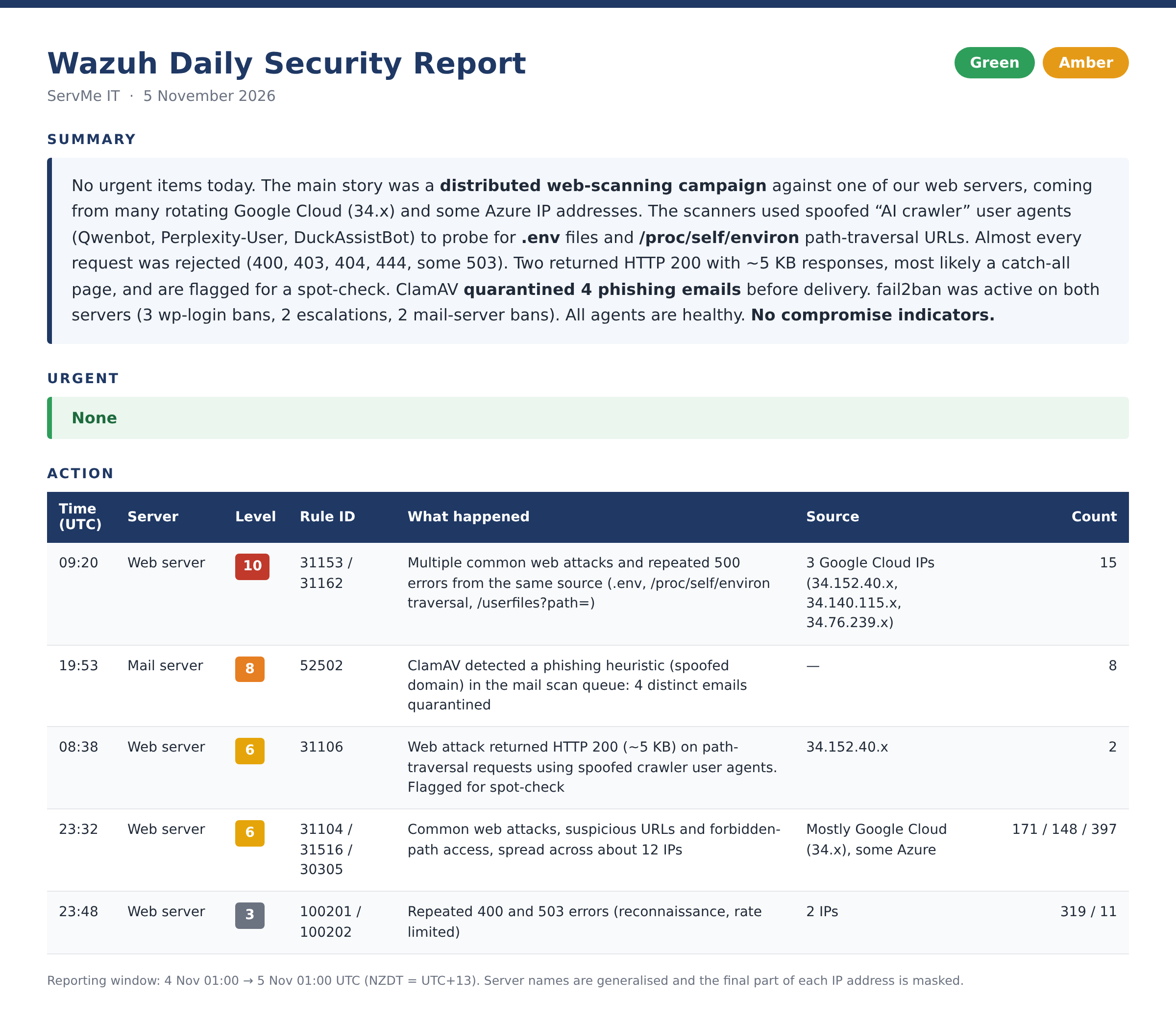
Every server we manage runs Wazuh, an open-source security monitoring platform that collects and analyses log data from web servers, mail servers, authentication systems and more. On a single moderately busy server, that’s routinely 30,000+ log events in 24 hours. No human is reading all of that line by line, and no human should try to.
Instead, we use AI-assisted analysis to turn that raw volume into a structured daily report: what’s routine, what needs a second look, and what’s genuinely urgent. The report groups repeat offenders, flags patterns that have been building over several days, and separates “a bot got a 404 and moved on” from “someone is actively trying to find a way in.” Crucially, it also tells us what’s *not* a concern and why — routine plugin updates, scheduled backups, a legitimate integration hitting an API — so we’re not chasing shadows.
Then a person reads it. Every day. That’s the part that doesn’t change no matter how good the tooling gets. The AI does the sorting; a human makes the call on what gets blocked, what gets watched, and what gets ignored.
What a Typical Week of Blocking Looks Like
Across our managed servers, the pattern that shows up again and again is automated scanning — bots, not people, working through long lists of known file paths and known vulnerabilities, looking for anything that hasn’t been patched. Common things we see and block:
– Repeated attempts to access `.env` files, `wp-config.php.BAK`, `.aws/credentials` and similar files that would hand over passwords or keys if they were ever accidentally exposed
– Path-traversal attempts trying to escape a website’s folder structure and reach system files like `/proc/self/environ`
– Distributed WordPress login attempts spread across a whole range of IP addresses, designed to slip under simple rate-limiting
– Recon scans — automated probing of what’s running on a server before a more targeted attack is attempted
Most of this traffic never gets anywhere. It hits a 403, a 404, or gets refused outright, and the request goes nowhere. But the volume is real, it’s constant, and leaving it unaddressed means wading through the same noise every single day. So when we see a source that’s been active across multiple days, or a whole range clearly being used for this kind of scanning, we block it — permanently, at the firewall, before it ever reaches a website.
Worried about your security
Case in Point: Who’s Actually Behind These IP Addresses?
One IP that kept reappearing in our reports — escalating through automated ban systems, disappearing, then coming straight back — was part of a small block of addresses, 62.60.128.0 through 62.60.135.255. Rather than just blocking it and moving on, we looked into who actually owns that range.
What we found was instructive. Instead of one legitimate hosting provider, that handful of addresses is carved up into a patchwork of tiny sub-blocks, each leased out to a different, separate operator:
– One block is registered in the United Kingdom, but the actual company behind it is based in Belgrade, Serbia — with an administrative contact in Kyiv, and an abuse contact that’s just a personal Gmail address.
– The neighbouring block is registered in Bulgaria, with the named registrant an individual based in South Africa.
– Another block in the same range belongs to a hosting reseller based in Iran.
None of that is inherently illegal — IP address space gets bought, sold and sub-leased constantly as part of how the internet works. But this specific pattern — a block fragmented into tiny pieces, each leased to a different shell-like entity in a different country, with throwaway personal email addresses as the only abuse contact — is a well-known signature of low-reputation IP space. It’s the kind of infrastructure that’s cheap, easy to obtain with minimal accountability, and asks very few questions about what it’s used for. Legitimate businesses very rarely end up running their actual operations out of address space that looks like this. Automated attackers, scanners and bulletproof hosting operations do, routinely.
That’s not a smoking gun for any single request — plenty of normal traffic does come from unusual corners of the internet. But combined with the scanning pattern we were already seeing, it was enough to make an easy call: block the whole range, not just the one IP.
Why We’re Sharing This
Most business owners never see any of this. The scanning happens constantly, in the background, against essentially every website on the internet — including yours, whether anyone’s watching or not. The difference isn’t whether you’re being targeted. It’s whether anyone’s actually looking, every day, closely enough to tell the difference between background noise and something that actually matters — and knows what to do about it when it does.
That’s what daily log review, AI-assisted analysis, and a genuine human decision-maker gets you: not a system that reacts after something goes wrong, but one that’s quietly closing doors before they’re ever properly tested.
Check out our other Blogs
Is Anyone Watching Yours?
-
If your current hosting or web support doesn’t involve someone actively reviewing security logs every day — and acting on what they find — you simply won’t know about activity like this until it’s already a problem.
If you’d like us to take a look at your current setup — no obligation — get in touch and we’ll let you know exactly where you stand.